

Demo
See TRM Cloud in action
Watch a short video of the app, then take a closer look at permits, RAMS, checks, observations, talks, sign-in, training, messages, site plans and the audit trail. Real screens from TRM Cloud, using example data.
-
Records save with no signal · QR site sign-in · Free 7-day trial · PDF records
Signed on screen
Saved on the device, synced later

Watch the video
TRM Cloud in under a minute
From the gate to the close of play: QR sign-in, permits, inspections, observations, toolbox talks and PDF records, all in one app.

A closer look at each part of the app
Each module works on its own, and they all share the same sites, team and records, so everything for a site is in one place.
What you saw
Permit to work
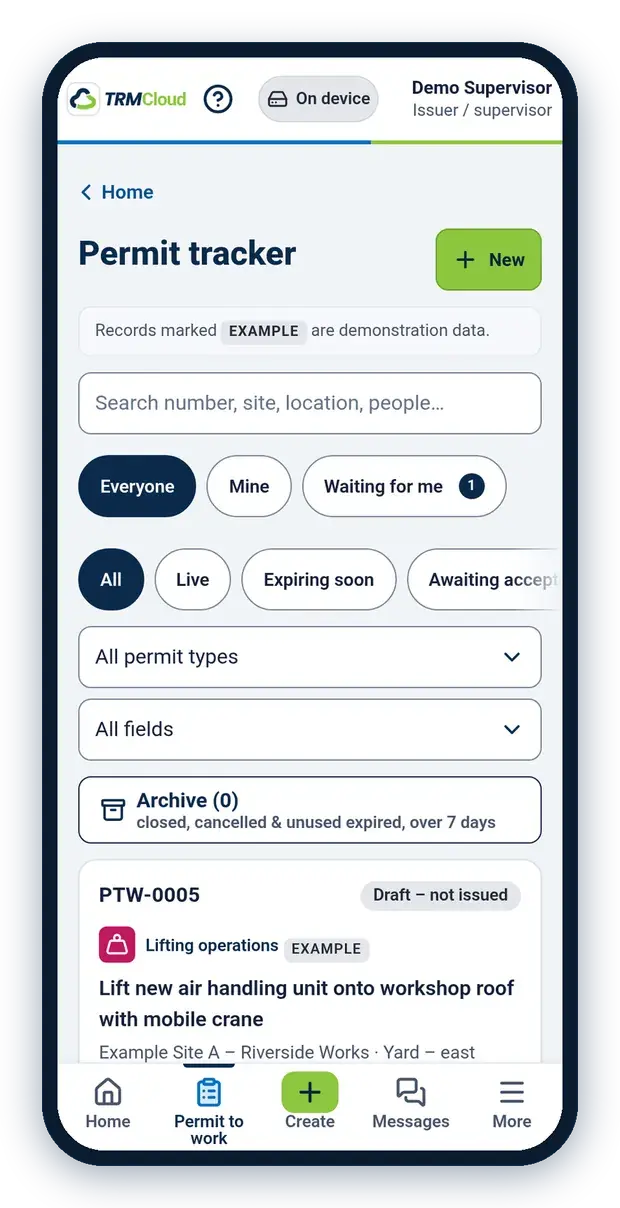
Know which permits are live, and which are about to run out
Issue a permit, have it accepted and signed on screen, then extend, hand back or close it out. The app shows clear warnings as a permit nears its expiry time.
-
Hot works, working at height, confined space, excavation, safe isolation / lock-off and lifting operations
-
Your own permit rules, set up when you add your company
-
Every step signed on screen, with who signed it and when in the audit trail
-
A PDF of every permit to share with your client or principal contractor

RAMS
Everyone works from the current version
Risk assessments and method statements with versions, review and approval, and worker sign-off.
-
Start from a template or upload your own PDF
-
Risk assessments and method statements with a risk matrix
-
Versions with review and approval
-
Workers sign to say they have read and understood them

Audits & Inspections
Find problems before work starts, and stop unsafe plant
Run site inspections, daily excavation inspections and plant pre-use checks from your phone. A Fail on a safety-critical item tags the machine out until a supervisor returns it to service.
-
Ready-made checklists, or your own
-
Checks for excavators, dumpers, telehandlers and more
-
Photos and comments on any answer
-
Turn what you find into actions with an owner and due date


Observations & actions
Spot it, report it, close it
Take a photo, or choose one, and AI drafts the type, a short description and any immediate action. Check the draft, edit anything that's wrong, then tap Submit observation. You can pin it on the site plan and turn it into an action with an owner and a due date.
-
Good practice, unsafe acts, unsafe conditions and near misses
-
Draft from photo: AI suggests the type and wording; you check it, then tap Submit observation.
-
Pin the report on the site plan. You are here is display only, and is not stored.
-
Signed to close

Inductions & Talks
Brief the team and collect signatures on the spot
Deliver toolbox talks and setting-to-work briefings, collect signatures on screen and keep a record of who attended and when.
-
Inductions, toolbox talks and setting-to-work briefings
-
Ready-made topics with key points, or your own topic
-
Each person signs on screen, on the same phone or their own
-
The talk and the attendance register saved as a PDF

Sites & QR sign-in
Know who is on site, with no app to install
Print a QR poster for each entrance. Workers and visitors scan it with their phone camera and sign in and out. No app or account needed.
-
Just a name and company to sign in
-
See who is on site now
-
Download the daily attendance register
-
Open a locked sign-in kiosk at the entrance

Training cards
Cards in, details suggested.
With From card or PDF, photograph a training or ID card, or upload a PDF, and AI suggests the person, training type, card number and the dates printed on the card. An administrator, manager or supervisor checks every field, matches it to a person and taps Save. Nothing is added until they do.
-
From card or PDF: AI suggests the details from a card or PDF; you check them and tap Save.
Training matrix
See training at a glance
Record training for your people, and see what is missing or due to expire. Workers can see their own record. Administrators can Remove training.

MESSAGES
Keep the team aligned
Group chats for a site or a team keep instructions and photos in the app.

SITE plans
See the plan, and match it to the ground
Mark hazards on the site plan. Staff can Match to the ground, so You are here can be shown when someone pins a report. The phone's position is display only, and is not stored.

FAQS
Common questions
Yes. You can use the app on its own and add our safety professionals later if you want help putting the system in place on site.
Yes. TRM Cloud is always included when our safety professionals work on your site.
Records are in your organisation's TRM Cloud account, not with our safety professionals.
Permits, inspections, plant checks and observations save to the phone and sync when you're back in signal. Signing in, adding people and the QR sign-in page need signal.
No. They scan the QR poster with their phone camera and enter their name and company.
Yes. Start your free 7-day trial: on the sign-in page, tap Enrol your company, set up your sites, add your team and try it on a real job. No card needed. After your trial, contact us to continue. Administrators, managers and issuers / supervisors can export your records.
The TRM Cloud app has a set price for each site: see Pricing. For TRM Cloud with Professional Integration, we quote on your sites, dates and support. Start with a free 7-day trial, no card needed.
How the free trial works
Free 7-day trial
Try TRM Cloud on a real job before you decide. No card needed. After your trial, contact us to continue. Administrators, managers and supervisors can export your records.
1
Enrol your company
On the sign-in page, tap Enrol your company. Enter your company name, your name, your work email and a password, then confirm your email, sign in and create your company.
2
Set up your sites
Add your sites, a site plan and your permit rules from a short checklist.
3
Add your team
An administrator adds people by work email. They get a link, lasting 7 days, to set a password and join. You can also copy or share the same link.
4
Decide after 7 days
Use it on site for the week, then decide if it's right for you.
Ready to run safer sites?
Try TRM Cloud free for 7 days, see it on a demo, or talk to us about a safety professional on your site.
Set up your company and sites in the app
A walk-through of the app for your sites
Safety professionals on your site, with the app included